Amount exceeded



4.7 out of 5 based on 52941 reviews


















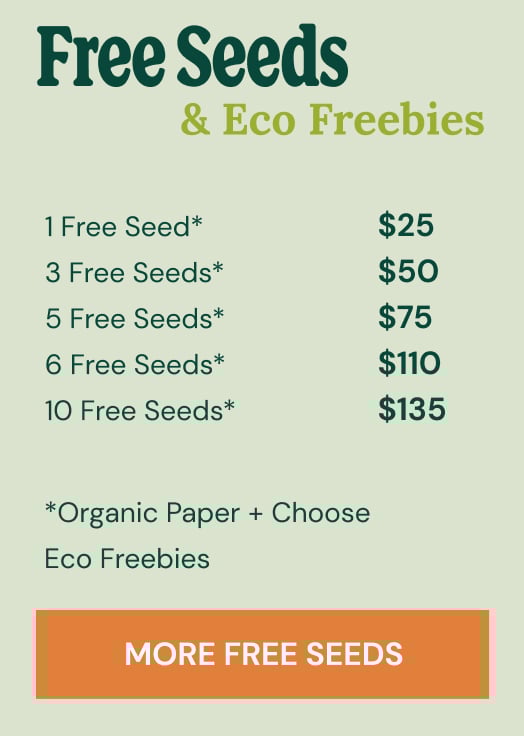
Included FREE items



Welcome to Royal Queen Seeds Help Center
To use a promo code on Royal Queen Seeds, follow these steps:
1. Add Products to Your Cart
Browse the Royal Queen Seeds website and select the items you wish to purchase.
2. Go to Your Shopping Cart
Once you’ve added all your desired items, click on the shopping cart icon in the top-right corner of the website.
3. Enter the Promo Code
Look for the promo code or discount code field on the cart or checkout page.
Enter your promo code exactly as it appears (promo codes are case-sensitive).
4. Apply the Code
Click the "Apply" or similar button to activate the discount.
5. Check Your Total
Ensure the discount is applied correctly before completing your order.
6. Proceed to Checkout
Continue with the checkout process to finalize your order.



Cookies settings
Functional cookies
Functional cookies help our website to function optimally and allow us to personalise certain features.Preference cookies
Preference cookies allow us to remember information that influences the way our website looks, including your preferred language based on your region.Analytical cookies
Analytical cookies give us insights into website traffic and customer behaviour, including how many people visit our site, how long they browse for, and which parts of our site they visit.What are cookies?
Cookies are small pieces of data from a particular website that get stored on a user’s computer while they’re surfing the internet. Cookies have several different functions. Some of them track browser activity that enables businesses to deliver targeted advertisements. Other cookies serve to remember user login details to different websites to make jumping on social media, or other sites, a more fluid process. Because each cookie has its own unique ID, these pieces of data allow website owners to measure the unique traffic coming into their site.Why do we use cookies?
Cookies come in handy when you visit our website. They ensure you stay logged in, that you can shop safely, and that the items you add to your cart stay there before you make a purchase. But cookies also help us. The data they provide allow us to improve our website and enable us to present you with targeted advertisements that are compatible with your interests.What kind of cookies do we use?
Functional cookies
Functional cookies help our website to function optimally and allow us to personalise certain features.Preference cookies
Preference cookies allow us to remember information that influences the way our website looks, including your preferred language based on your region.Analytical cookies
Analytical cookies give us insights into website traffic and customer behaviour, including how many people visit our site, how long they browse for, and which parts of our site they visit.How can I disable or delete cookies?
Not a fan of cookies? No worries. You can disable them (with the exception of necessary cookies) in your browser settings. However, blocking cookies may impact your browsing experience and prevent you from enjoying all of the technical features of our site.Our website won't work without these cookies activated. Therefore functional cookies can't be disabled.
To ensure a safe online environment and guarantee adequate data protection, we strictly comply with all legal requirements. In this privacy statement, we provide information about how and for what purpose data is collected, safety measures, storage periods and contact details.
COMPANY NAME: SNORKEL SPAIN, SL (hereinafter ROYAL QUEEN SEEDS)
C/ Vilar d'Abdelà, 5 (nave 1) CP: 08170 de Montornès del Vallès
+34 937 379 846
The present Privacy Policy sets out the terms on which we will treat personal data at ROYAL QUEEN SEEDS; this includes any personal data collected through our website https://www.royalqueenseeds.com/ as well as any other data we process in the course of our business activities.
ROYAL QUEEN SEEDS collects the following personal data for the purposes listed below:
Account purchases can only be made if you are in possession of a personal account. When you create an account or purchase something from our shop, as part of the buying and selling process we collect the following personal information that you provide to us:
This information is required for delivery. In addition, when you browse our shop, we automatically receive the Internet Protocol (IP) address of your computer. Based on this information, we can optimise your online experience and at the same time protect our online environment.
We collect and store account-related data for the following purposes:
(a) to carry out obligations arising from any contracts between you and us, and to provide you with information, products and services that you may request from us;
(b) to set up, manage and communicate with you about your account and your orders;
(c) to conduct market research and analysis;
(d) to confirm your age and identity, and to detect and prevent fraud.
With your explicit permission, we may send you newsletters about our shop, new products and other updates. We send newsletters based on your explicit consent. In the event that you purchase a product, and in accordance with current regulations, we may send you commercial communications in accordance with the legitimate interest of our company, always about products or services similar to those you have purchased or contracted. In any case, you may exercise your right of opposition through the channels announced in this Privacy Policy. The following information is collected in relation to the newsletter:
We do not need to know the sex of the person in order to send the newsletter (data minimisation: by law we must ask for data that is strictly necessary to provide the service, and in this case knowing the sex is not necessary to send the newsletter).
The data collected is used to:
(a) personalise our emails, including your name and gender;
(b) provide gender-specific content.
You can withdraw your consent at any time by using the link provided in the newsletter or the contact information provided in section 2.
In order to provide appropriate support, our customer service employees have access to information related to the account. Consequently, their support will be highly effective and friendly. The data provided in our contact form is used by our CRM provider, SuperOffice. We will only use your details to respond to your message.
If you have purchased any of our products, please note that we may process your personal data for promotional purposes, based on Royal Queen Seeds' legitimate interest only to offer you products or services from our company and about products or services similar to those you have purchased. You may exercise your right to opt out of future messages by the means set out in this Privacy Policy or through any notification you receive.
If you change your mind, you can withdraw your consent for us to contact you for the purpose of collecting, using, or disclosing your data at any time by reaching out to us at: [email protected].
We may disclose your personal information if we are required to do so by law or if you breach our Terms of Service.
At Royal Queen Seeds, we will not retain your data for longer than is necessary for the purposes described in this Policy. Different retention periods apply for different types of data; however, the longest period we will normally hold any personal data is 10 years.
Data relating to the account remains relevant for as long as the consumer is in possession of an account. Therefore, the data remains documented for as long as the account exists. When our customers delete an account, the associated data will be deleted within a reasonable period of time. Requests regarding the inspection or correction of stored personal data or the deletion of an account can be sent to [email protected].
In the event that you give us your consent to inform you about our products or services, we will keep your data until you express your wish not to receive any further communications from us. However, we regularly (every month) carry out a relevance check. Registered customers (and their personal information) will be deleted whenever customers do not reply to our request. In addition, our newsletter mailing has an opt-out feature. Consumers can withdraw their consent by using this opt-out feature.
Cookies are small information files that notify your computer of previous interactions with our website. These cookies are stored on your hard drive, not on our website. Essentially, when you use our website, your computer displays its cookies to us, informing our site that you have visited before. This allows our website to function more quickly and remember aspects related to your previous visits (such as your username), making your experience more convenient. At Royal Queen Seeds, we use two types of cookies: functional and analytical.
Functional cookies are used to enhance your online experience. Among other things, these cookies track what is added to your shopping cart. The use of these cookies does not require prior authorization.
Analytical cookies are used for research and market analysis. The data collected with these analytical cookies is anonymous, making it unusable for third parties. The use of these cookies does not require prior authorization.
Third-party services are required to conduct transactions and provide our services. In general, the third-party providers we use will only collect, use and disclose your information to the extent necessary to enable them to perform the services they provide to us.
However, certain third-party service providers, such as payment gateways and other payment transaction processors, have their own privacy policies regarding the information we must provide to them for your transactions.
We encourage you to read the privacy policies of these providers so that you can understand how these providers will handle your personal information.
In particular, certain suppliers may be located or have facilities located in a different jurisdiction than yours or ours. Therefore, if you choose to proceed with a transaction involving the services of a third party, your information may be subject to the laws of the jurisdiction in which that service provider or its facilities are located.
Once you leave our website or are redirected to a third-party website or application, you are no longer governed by this Privacy Policy or the Terms of Service of our website.
On this website we have integrated an element of a web analytics service (with anonymisation functionality). Web analytics can be defined as the gathering, processing and analysis of data about the behaviour of visitors to websites. An analytics service collects, among other things, data about which website a person came from (the so-called referrer), which sub-pages they visited or how often and for how long they visited a sub-page. Web analytics is mainly used for website optimisation and for a cost–benefit analysis of internet advertising.
To complete deliveries we use a courier service. This courier service carries out the delivery between our company and the consumer's home. To complete these logistics, the company requires access to the consumer's name and address information.
Royal Queen Seeds uses a third-party mail service provider to send its newsletter. This provider has access to limited account information related to opt-in consent (e.g. email address).
Royal Queen Seeds has the support of a company that specialises in marketing and communication activities. Their access to personal information is very limited and mostly anonymous.
At Royal Queen Seeds we use external payment services to handle our transactions (e.g. credit card payments).
To protect your personal information, we take reasonable precautions and follow industry standard best practices to ensure that it is not inappropriately lost, misused, accessed, disclosed, altered or destroyed.
If you provide us with your credit card information, the information is encrypted using secure socket layer technology (SSL) and stored using AES-256 encryption. Although no method of transmission over the internet or electronic storage is 100% secure, we follow all PCI-DSS requirements and implement additional industry standards that are commonly accepted. Information related to the account is protected with a hashing method. This method transforms the information into a generated hash. As a result, confidential information is protected and invisible, even to us. In addition, our databases are exceptionally protected against unauthorised access. For example, access to the database is only possible and permitted via approved IP addresses (e.g. from Royal Queen Seeds headquarters). Other attempts and addresses are rejected at all times.
Furthermore, data is anonymised as much as possible, so it cannot be directly linked to a specific consumer. With this data, however, we may be able to carry out market research and analysis. In addition, the third parties concerned (e.g. mailing service) are examined prior to our collaboration, comply with the GDPR from the EU and receive a processing agreement. Within Royal Queen Seeds, employees are assigned different access permissions. Specific permission provides access only to information that is strictly required to perform a task. Digital security measures are subject to change and must meet high requirements to ensure the safety of online customers. That is why, at Royal Queen Seeds, we appoint a security officer. Regular verification and improvement of security measures (where necessary) are part of the role.
We reserve the right to modify this Privacy Policy at any time, so please check back regularly. Changes and clarifications will be effective immediately upon being published on the Website. If we make substantial changes to this policy, we will notify you here that it has been updated so you will know what information we collect, how we use it and under what circumstances, if any, we use and/or disclose it.






 Back
Back
 If you have further questions